'%3e%3cpath%20fill-rule='evenodd'%20clip-rule='evenodd'%20d='M64.439%2053.4989V38.4115H76.7512L92.5774%2019.0421C86.0414%2019.0421%2079.5033%2019.0421%2072.9673%2019.0421C64.5708%2019.0421%2065.2991%2018.1715%2059.121%2024.3496L45.0591%2038.4115H22V19.0421H45.0591V77.2193L64.439%2053.4989Z'%20fill='black'/%3e%3c/g%3e%3c/svg%3e)
How to Build an Internal CRM With AI (A Real Build, Step by Step)
A real, step-by-step build: how a seven-person video studio replaced a 2,400-row spreadsheet with a custom internal CRM in nine days using AI — the data model, prompts, security rules, costs and results.
TL;DR
A seven-person video production studio replaced a 2,400-row Google Sheet with a custom internal CRM in nine working days, using AI to write almost all of the code. Total build cost: about $340 in tool credits and roughly 26 hours of one non-technical founder's time. It replaced $312/month of CRM seats and cut the time to send a proposal from two days to under three hours.
This article walks through that exact build: the pipeline they mapped, the four database tables they ended up with, the prompts that worked, the security rules they added, how they migrated the spreadsheet, and what broke. Copy the structure, swap in your own process.
If you want the wider version of this topic, we already wrote the general playbook for building internal tools with AI. This one is deliberately narrow: one company, one CRM, one set of decisions.
Why most small teams outgrow a CRM instead of growing into one
Every generic CRM makes the same bet: that your sales process looks roughly like everyone else's. Leads arrive, you qualify them, you send a quote, you close or lose. If that's your business, use HubSpot's free tier and stop reading. You'll be happier.
The problem shows up when your real process has a step nobody sells software for. A recruitment agency needs a candidate on one side and a role on the other, and the "deal" is a match between them. A construction firm's deal doesn't progress by conversation, it progresses by site survey. A production studio's deal stalls on whether a specific director is free in week 34.
What happens next is predictable. Someone tries to bend the CRM: custom fields, a workflow automation, a Zap that copies data into a spreadsheet. Six months later the team trusts the spreadsheet and ignores the CRM, but you're still paying for both. That's the state Northline Studio was in when they called us.
This is the same failure pattern we described in our ops playbook on replacing spreadsheets with a web app — the spreadsheet isn't the disease, it's the symptom that the software doesn't match the work.
Meet Northline Studio: the actual problem
Northline is a commercial video production studio. Seven people: two founders, a producer, two editors, a part-time bookkeeper, and an account manager. They shoot brand films for mid-size consumer companies, averaging €18,000 per project, closing about four projects a month out of roughly 55 inbound and referred leads.
Here's what their sales operation actually looked like before the build:
- Leads arrived in four places. A website contact form that emailed the shared inbox, Instagram DMs, LinkedIn messages to whichever founder was tagged, and referrals that came in as phone calls.
- The source of truth was a Google Sheet with 2,400 rows going back three years, 31 columns, and four people editing it simultaneously. Three columns were duplicates of each other with different spellings.
- Quoting was the bottleneck. Every proposal needed the producer to check crew availability, pull a rate card, and estimate shoot days. She was the only person who knew how to do this, and she was on set two days a week.
- They'd tried Pipedrive. Cancelled after five months. It couldn't represent "this deal depends on a specific director being free in a specific week," which is the single most important fact about every deal they have.
- Nothing was ever marked lost. So they had no idea why they lost. Best guess was "price," which turned out to be wrong.
The thing they wanted wasn't a CRM. It was an answer to one question: which deals are real, and what's the next thing someone has to do about them?
Step 1: Map the real pipeline before opening any tool
This is the step people skip, and it's the step that determines whether the build works. Northline's founders sat down with the producer for 90 minutes and wrote out what actually happens to a lead, in their own words. Not stages a CRM vendor would recognise — the real ones:
- Enquiry — someone made contact. No qualification yet.
- Scoping call held — 30 minutes, establishes budget range and deadline.
- Availability check — can we crew this in the client's window? This is a yes/no gate, and it kills about 20% of deals.
- Proposal sent — a PDF with shoot days, crew, and a price.
- Negotiating — usually scope reduction, not price reduction.
- Won — signed and deposit invoiced.
- Lost — with a mandatory reason.
Two things jumped out immediately. First, "availability check" is a stage no off-the-shelf CRM has, and it's the stage where money is made or lost. Second, they had no stage for "went quiet," which is where a third of their leads actually end up. They added an eighth status: Dormant, with an automatic move after 21 days of no contact.
If you do nothing else from this article, do this exercise. Write the stages your team says out loud. If you want a structured way to capture the whole spec before you build, our free PRD generator will push you through the same questions.
Step 2: Decide what your CRM must not do
A custom CRM fails by bloat, not by lack of features. Northline wrote a "not building this" list before the first prompt, and stuck to it:
- No email inbox integration. Tempting, genuinely hard, and their email lives in a shared Gmail that works fine. Deals get a manual note instead.
- No invoicing. The bookkeeper uses Moneybird and is not giving it up.
- No reporting dashboard. In month one, nobody needs charts. They needed the data to be clean first.
- No mobile app. A responsive web page opened on a phone covers the one use case (checking a deal from a shoot).
- No permissions hierarchy. Seven people who all trust each other. Everyone logged in sees everything; the only rule is that you must be logged in.
That last one matters more than it looks. Complex permission models are where AI-generated apps most often ship real security holes, because the rules are subtle and the code looks correct. Cutting the requirement removed a whole class of risk. We go deep on that problem in our guide to scanning AI-generated software for vulnerabilities.
Step 3: Design the data model on paper
AI builders are very good at writing code and very bad at guessing your data model. Give them the model and the quality of everything downstream jumps.
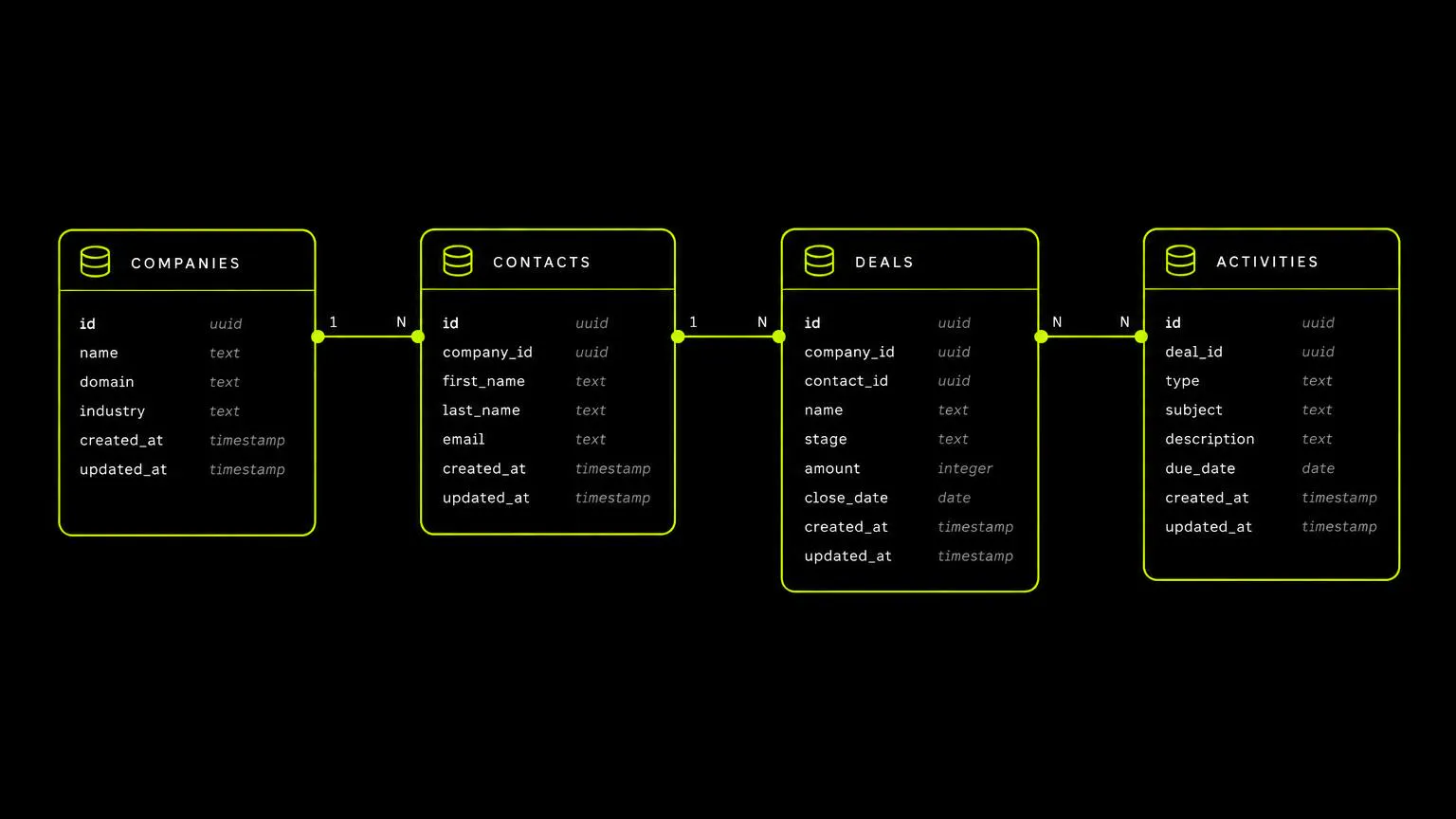
Northline ended up with four tables. That's it.
companies — the client organisation, not the person.
- id, name, website, industry, city
- source (one of: website, instagram, linkedin, referral, repeat)
- notes, created_at
contacts — humans, linked to a company.
- id, company_id, full_name, role, email, phone
- is_primary (boolean)
deals — the unit of work.
- id, company_id, primary_contact_id, title
- stage (the eight stages from step 1, as a database enum)
- value_eur, shoot_days, target_shoot_window_start, target_shoot_window_end
- required_director (nullable text — the field Pipedrive couldn't do)
- owner_id (which team member is responsible)
- lost_reason (nullable enum: price, timing, crew unavailable, went internal, no response, other)
- last_contact_at, created_at, updated_at
activities — an append-only log of what happened.
- id, deal_id, author_id, type (call, email, meeting, note, stage change), body, occurred_at
Three design decisions did most of the heavy lifting:
Companies and contacts are separate. Northline's clients change marketing managers constantly. Keeping the company as the anchor means three years of history survives a personnel change.
lost_reason is required to enter the Lost stage. Enforced in the database, not just the form. Six weeks of this data showed the real top reason was crew unavailable, not price — which changed how they hire freelancers, and is worth more than the entire CRM.
Activities are append-only and never edited. No "who changed this?" mysteries. Every stage change writes an activity row automatically.
If you're weighing whether a no-code database would have been enough here, that trade-off is exactly what we unpack in Airtable vs custom app. For Northline, the availability gate and the enforced lost reason pushed it over the line to custom.
Step 4: The first prompt
Northline built in Lovable with a Postgres database behind it. The first prompt was long and boring on purpose. Long, specific first prompts produce dramatically less rework than "build me a CRM" — and rework is what costs you credits, as we measured across ten builds in real Lovable token costs: 10 MVPs tracked.
Here's the shape of what they sent, trimmed:
Build an internal CRM for a seven-person video production studio. Only logged-in team members can use it; there is no public signup — I will invite users manually.
Create these tables with row level security enabled, readable and writable only by authenticated users: companies, contacts, deals, activities. [full field list from step 3 pasted here]
The deal stage is an enum with exactly these values: enquiry, scoping_call, availability_check, proposal_sent, negotiating, won, lost, dormant. A deal cannot be set to 'lost' without a lost_reason.
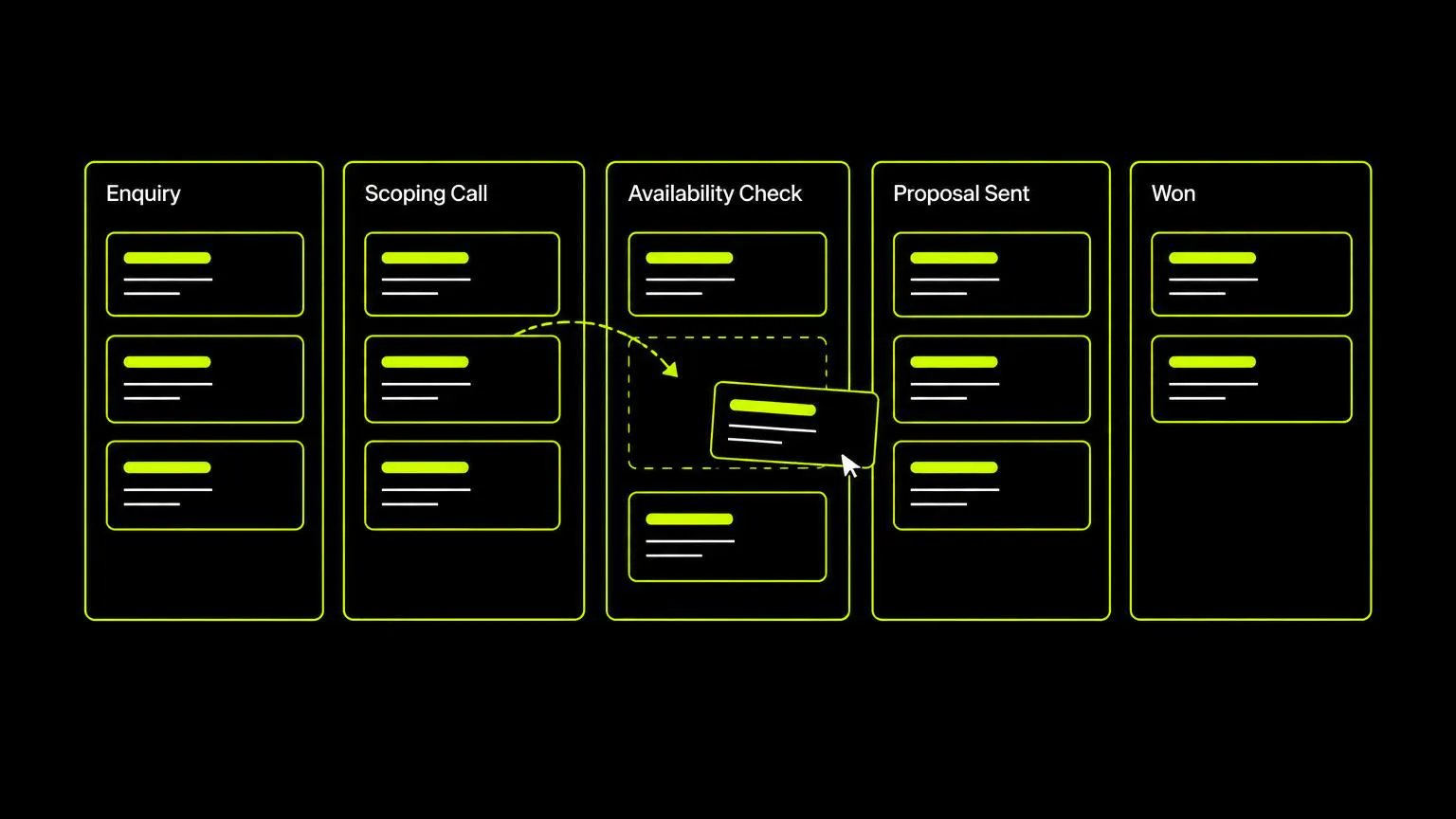
Screen 1: a pipeline board, one column per stage except lost and dormant, cards showing company name, deal value, target shoot window, and required director. Drag a card between columns to change stage.
Screen 2: a deal detail page with all fields editable inline, the linked company and contacts, and the activity log newest-first with a box to add a note.
Screen 3: a single table of all deals with filters on stage, owner, and source, and text search on company name.
Use a clean, dense, information-first layout. No marketing sections, no hero, no illustrations. This is a tool people use eight times a day.
Build the database and the three screens. Do not add email sending, invoicing, or reporting.
Two details worth stealing. "No public signup" stated up front prevents the builder from scaffolding an open registration page that anyone on the internet can use — a genuinely common and genuinely serious mistake. And "do not add" is as important as "add," because these tools are eager to be helpful.
That prompt produced a working board, detail page, and list in one pass. Not finished, but real.
Step 5: Making the board match how people think
The first version was functional and wrong in small ways that matter enormously for adoption. Fixing these took two days of small, one-thing-at-a-time prompts:
- Cards were too tall. Only five visible per column. Asked for a compact card: company name bold, value, shoot window as W34–W36, director initial in a small badge. Fourteen visible per column afterwards.
- No sense of decay. Added a coloured left border driven by last_contact_at: green under 7 days, amber 7–14, red over 14. This one change did more for follow-up discipline than any reminder feature.
- The availability gate needed to be loud. Deals in availability_check show the required director and shoot window in the card header, and the column shows a count. The producer now clears that column every Monday morning in ten minutes.
- Drag felt risky. Added an undo toast after every stage change. People drag confidently when mistakes are cheap.
- Column totals. Each column header shows deal count and summed value. The founders asked for this within an hour of first seeing the board.
The lesson: build the data model carefully and the interface iteratively. Interface changes are cheap and obvious once real data is in front of a real user; data model changes are expensive. Prompt in single changes, not batches of six — it's easier to see what broke, which is the same discipline we recommend in our guide to building with Lovable.
Step 6: The AI features that earned their place
"Build a CRM with AI" usually means AI wrote the code. Northline also added AI inside the product, but only three features, each replacing a specific recurring chore. They rejected six other ideas.
1. Lead intake parsing. Their website form used to email the shared inbox, where someone retyped it into the sheet. Now the form posts to the CRM, and a small AI step reads the free-text message and proposes a company name, industry, estimated budget band, and target shoot window. It creates the deal in enquiry with a "needs review" flag. A human confirms in about 15 seconds. Time saved: roughly four minutes per lead, 55 times a month.
2. Proposal first draft. Given a deal's fields and its activity log, generate a proposal skeleton: understanding of the brief, proposed shoot days, crew list, and assumptions. It does not generate the price — pricing comes from their rate card, deliberately, because a hallucinated number in a client-facing quote is a real business risk. The producer edits the draft instead of starting blank. Proposal turnaround went from two days to under three hours.
3. Weekly stale-deal summary. Every Monday at 7am, a scheduled job sends the founders a short digest: deals untouched over 14 days, deals in availability_check awaiting a decision, and anything moved to dormant last week. Plain text, six lines. They read it.
What they rejected: AI lead scoring (55 leads a month — humans are better and cheaper at this volume), AI call transcription (nobody asked), sentiment analysis on emails, an AI chat assistant over the CRM data, auto-generated follow-up emails, and a "predicted close date." Every one of those is a feature a CRM vendor would sell you. None of them solved a problem Northline actually had.
The test we apply: name the chore, name the minutes, name who stops doing it. If you can't, it's not a feature, it's a demo. That framing comes straight from our playbook on building simple AI productivity workflows.
Step 7: Locking it down
This is the part people skip and it is not optional. An internal CRM holds client names, contact details, deal values, and notes people would not want read aloud. Under GDPR that's personal data you're responsible for — the ICO's guidance for organisations is the plainest-English summary we've found.
Five things Northline did, in order:
1. Row level security on every table, verified by hand. AI builders will happily tell you security is enabled while leaving a policy that allows anonymous reads. They logged out, opened the app's data endpoint in a private browser window, and confirmed it returned nothing. Supabase's RLS documentation explains the model properly; read it once even if you never write a policy yourself.
2. Closed signup. Public registration disabled. Users are invited by email. Without this you have a CRM anyone can join.
3. No secrets in the browser. The AI parsing and proposal calls run server-side. An API key in front-end code is visible to anyone who opens their browser's developer tools, and will be found and billed to you.
4. Rate limits on the public form. The only unauthenticated door into the app. Capped at 10 submissions per IP per hour, because a lead form that triggers an AI call is a free way for a stranger to spend your money. The OWASP Top 10 for LLM applications covers this and the related prompt-injection risks.
5. A scan before go-live. Automated secret scanning and dependency checks, then a manual click-through as a logged-out user trying to reach every page. Took 40 minutes and found one thing: an old debug page listing all deals with no auth check. That single find justified the whole exercise.
Step 8: Migrating 2,400 rows without importing the mess
The temptation is to import everything. Don't. Northline's sheet had three years of inconsistent data, and importing it would have poisoned their new, clean, enforced schema on day one.
What they did instead:
- Imported only the last 14 months of deals. 380 rows out of 2,400. Everything older went to a read-only archive sheet linked from the CRM's footer. Nobody has opened it since March.
- Deduplicated companies first. 380 deals collapsed into 214 companies. They did this in the spreadsheet before importing, using a manual pass — 90 minutes of genuinely tedious work that saved weeks of confusion.
- Assigned a stage to every open deal by hand. 41 open deals, one person, 25 minutes. Faster and more accurate than any mapping rule.
- Backfilled lost_reason only where it was knowable. 60% got a real reason; the rest got "other." Honest gaps beat invented data.
- Ran both systems for one week. The sheet stayed editable for five working days as a safety net, then was set to view-only on the Friday. Deleting it was the point — two sources of truth is worse than either one alone.
Step 9: Getting seven people to actually use it
A tool nobody opens is a failed project regardless of how good the code is. Three things made it stick:
Nobody types twice. Every field that existed in the sheet exists in the CRM, and nothing has to be re-entered anywhere else. The moment a team member has to keep a shadow spreadsheet, you've lost.
One 20-minute walkthrough, recorded. Not a manual. A screen recording of the producer doing a real Monday morning in the new tool. New freelancers watch it and are productive immediately.
A Monday ritual attached to it. The founders open the board in their weekly meeting and clear the availability column. The CRM is now the agenda, not an admin task competing with the work.
The trap to avoid: don't grant everyone edit access to everything and then police it socially. Northline could get away with a flat permission model because they're seven people who trust each other. At fifteen, they'll need owner-scoped editing, and they know it's coming.
What it cost and how long it took
Real numbers from this build:
- Elapsed time: nine working days, spread over three calendar weeks.
- Founder time: about 26 hours, including the pipeline mapping session and the migration.
- AI credits: roughly $290 across the build, plus $50 for the false starts in week one. Around $340 total.
- Running cost: $25/month for hosting and database, plus $8–14/month in AI usage for parsing and proposal drafts.
- Replaced: $312/month of CRM seats they'd have needed at their headcount on a mid-tier plan.
- Payback: the build paid for itself in month two.
Two honest caveats. First, this founder had built two small internal tools before, so week one was not her first experience with an AI builder. A true first-timer should budget 40+ hours and expect to throw away more early work. Second, $340 in credits is only plausible because the data model was decided on paper first. Redesigning the schema mid-build is the single most expensive thing you can do, and it's what turns a $340 build into a $1,200 one.
If you want to sanity-check your own numbers, our MVP cost estimator is calibrated on builds like this, and our timelines-by-product-type breakdown gives realistic ranges for internal tools specifically.
Results after 90 days
Not a case study with round numbers. What actually changed:
- Proposal turnaround: two days to under three hours. The single biggest commercial effect. They now quote while the client is still excited.
- Close rate up from 7.3% to 11.1% of enquiries. Some of that is faster quoting. Some is that they stopped chasing deals that failed the availability gate.
- They learned why they lose. Crew unavailability, not price. They now keep two freelance directors on soft retainer for peak weeks, which came directly from one enforced database field.
- 41 open deals visible to everyone, versus a spreadsheet only the producer really understood.
- Two things broke. The weekly digest silently stopped for three weeks (a scheduled job failed and nobody was watching). And the AI parser kept guessing the wrong shoot window for anything written as "end of Q3," which took two prompt fixes. Neither was a crisis; both are the kind of thing you should expect and check for.
When you should not build your own CRM
Being honest about this matters more than selling you on a build.
Don't build if your process is standard. If HubSpot's free tier maps cleanly to how you sell, use it. A custom tool you have to maintain is a real ongoing cost.
Don't build if you need deep email and calendar sync. Two-way sync with Gmail and Outlook is genuinely hard engineering, and it's the main thing you're paying commercial vendors for.
Don't build if you're regulated. Healthcare, finance, and anything needing audit trails and certifications — buy compliance, don't write it.
Don't build if nobody owns it. Internal tools need a person who fixes things when they break. No owner, no tool.
Do build when the thing that determines your deals is a concept no CRM has a field for. That was Northline's whole reason, and it's the clearest signal there is. If you're unsure which side you're on, our no-code decision tree walks through it, and our MVP development team will tell you honestly if you should just buy something instead.
The checklist
If you're doing this yourself, in this order:
- Write your real pipeline stages in your team's own words. Include the stage no CRM has.
- Write the "not building this" list. Be aggressive.
- Design your tables and fields on paper. Decide what the database enforces.
- Write one long, specific first prompt. State explicitly that there's no public signup.
- Build the board, the detail page, and the list. Nothing else.
- Iterate the interface in single, small prompts with real data in front of a real user.
- Add AI features only where you can name the chore and the minutes saved.
- Lock down access: row level security, closed signup, server-side secrets, rate limits. Verify logged out.
- Migrate 12–18 months of data, deduplicated by hand. Archive the rest.
- Run both systems for one week, then delete the spreadsheet.
- Record a 20-minute walkthrough of a real working session.
- Attach it to a weekly ritual so it becomes the agenda, not a chore.
Working through the commercial side of a build like this — pricing, adoption, making it pay — is what Vibe Coded to Paid covers in depth.
Frequently asked questions
How long does it take to build an internal CRM with AI? For a small team with a clear process, budget nine to fifteen working days of part-time effort. Northline took nine days and about 26 hours of hands-on work. A first-timer should assume double. Most of the variance comes from how well the data model was decided before building, not from coding speed.
How much does it cost? Northline spent about $340 in AI credits and runs the tool for $33–39/month. Expect $300–900 in build credits for a CRM of this scope, and $25–60/month to run. If your credit spend is running far above that, it's almost always schema churn — stop and redesign on paper.
Can a non-technical person really do this? Yes, for a tool of this shape, with one condition: you must be willing to check the security work rather than trust that it happened. Logging out and confirming you can't read your own data is a five-minute job anyone can do. If you skip it, get a developer to review before you put real client data in. Our explainer on vibe coding covers what these tools do and don't do for you.
Is an AI-built CRM secure enough for real customer data? It can be, and it is not by default. The non-negotiables are row level security on every table verified while logged out, no public signup, no API keys in front-end code, and rate limits on any public form. Run a scan before go-live. Northline's scan found an unprotected debug page — that's typical, not unusual.
Should I use Airtable or Notion instead? If your process fits a table with a few views, yes — they're faster to set up and cheaper to maintain. Build custom when the database needs to enforce rules (Northline's mandatory lost reason), when you need a gate that blocks progress, or when per-seat pricing at your headcount exceeds the build cost. Our Airtable vs custom app guide has the full comparison.
Which AI builder should I use? Northline used Lovable because they wanted a real database and their own code repository. Bolt is faster for throwaway prototypes; Replit suits you better if you need custom backend jobs. We benchmarked all three on an identical brief in Lovable vs Bolt vs Replit.
What if my sales process changes? That's the main advantage of owning it. Northline added a ninth stage in month two — a single prompt and a database migration, done in under an hour. The thing to avoid is changing the shape of your core tables repeatedly; adding a stage or a field is cheap, restructuring relationships is not.
Should I import my whole spreadsheet? No. Import 12–18 months, deduplicate your companies by hand first, and archive the rest as a read-only file. Old inconsistent data will undermine trust in the new system faster than missing data will.
Do I need AI features inside the CRM, or just AI to build it? Most teams need only the second. Add in-product AI where a specific person stops doing a specific repetitive task — Northline's three features each replaced a named chore. Skip lead scoring and predictive close dates at small volume; a human who knows the client is more accurate.
What breaks first? Scheduled jobs failing silently, and AI steps quietly producing bad values. Add a heartbeat you'd notice — Northline's digest now includes a line saying how many deals it scanned, so an empty or missing email is obvious. Also expect one or two permission mistakes; find them by clicking through your app logged out.
Can we move to a real CRM later if we outgrow this? Yes, and it's easier than the reverse. You own a clean relational database with a deliberate schema, which exports to any commercial CRM far more cleanly than a spreadsheet does. Several teams we've worked with treat a custom internal CRM as the two-year solution that buys them time to learn what they actually need.
Where do I start if I don't know my own process? Book 90 minutes with whoever does the selling and write the stages down in their words. That session is the highest-leverage part of the entire build. Then use our PRD generator to turn it into a spec, and browse the rest of our knowledge base for the specific build you're planning.
Keep Reading

Build a Simple Productivity Workflow With AI
A practical 7-step method to turn one repetitive weekly task into an AI workflow: pick the task, map it, prompt it, connect it, keep a human checkpoint, and measure the hours you get back.
Read more
How to Scan AI-Generated Software for Security Vulnerabilities
A practical, five-layer playbook for scanning AI-generated apps: secrets, dependencies, SAST, access control and runtime testing — plus a 30-minute self-audit and pre-launch checklist.
Read more
Building Internal Tools With AI: The 2026 Playbook for Non-Technical Teams
How to build internal tools with AI in 2026: what to build, what to buy, real timelines and costs, the security mistakes everyone makes, and the 8-step process we use to ship internal apps in days instead of quarters.
Read more