'%3e%3cpath%20fill-rule='evenodd'%20clip-rule='evenodd'%20d='M64.439%2053.4989V38.4115H76.7512L92.5774%2019.0421C86.0414%2019.0421%2079.5033%2019.0421%2072.9673%2019.0421C64.5708%2019.0421%2065.2991%2018.1715%2059.121%2024.3496L45.0591%2038.4115H22V19.0421H45.0591V77.2193L64.439%2053.4989Z'%20fill='black'/%3e%3c/g%3e%3c/svg%3e)
What Is Vibe Coding? The 2026 Guide to AI-Assisted App Development
What is vibe coding, why is it trending, and where does it break down in production? A realistic senior developer breakdown of limits, security, and next steps for founders.
Intro
Vibe coding is the fastest way to turn an idea into a working app, and the fastest way to create a product you can’t maintain.
It’s also very real.
In 2026, “I built it with AI” is no longer a flex, it’s a workflow. What’s changing is who can build. People who never wrote a line of code are shipping internal tools. Freelancers are delivering MVPs faster. Agencies are compressing timelines by weeks. And dev teams are increasingly working like product managers who speak in acceptance criteria and tests, while AI writes much of the implementation.
But most people are doing vibe coding the meme way:
- prompt something vague,
- accept changes,
- chase errors,
- add features because it’s fun,
- then wonder why it breaks the moment a real user touches it.
This article is the opposite. It’s a practical, ship-ready playbook for:
- What is vibe coding (a clean definition you can repeat)
- Vibe coding with Lovable (prompt-to-app workflow, Plan mode, shipping and SEO)
- Vibe coding with Claude (Claude Code repo workflow, CLAUDE.md, verification loop)
- The hybrid approach that teams use to go from “vibes” to “production-ish”
If you want the short version: vibe coding is not “no rules.” It’s “rules that are written in English, enforced by verification.”
Key takeaways
- Vibe coding is an AI-first way of building software where you describe intent in natural language and iterate by running the app and prompting changes, often without manually writing or reviewing every line.
- The term is widely attributed to Andrej Karpathy’s February 2025 post describing “fully giving in to the vibes,” often accepting diffs and iterating from errors.
- Vibe coding is great for MVPs and internal tools, but it fails without guardrails (scope locks, permissions, tests, and ownership).
- Lovable is vibe coding for full-stack app scaffolding: Plan mode, breaking work into “bricks,” GitHub integration, and SEO/GEO guidance.
- Claude Code is vibe coding on a real repo: it follows an agentic loop (gather context → take action → verify results) using tools like file search, edits, and running tests.
- The safest workflow is often: Lovable to scaffold → GitHub for ownership → Claude Code to harden, test, and iterate.
What is vibe coding?
Vibe coding is an AI-assisted software development practice where the developer describes a project or task in natural language, the AI generates code, and the developer guides the result by iterating on behavior instead of manually writing every line. The “vibe” is the intention and desired outcome, not the syntax.
The term is widely attributed to Andrej Karpathy’s February 2025 post describing a style of building where you “give in to the vibes” and frequently accept generated changes, then steer using errors and prompts.
What vibe coding is not
Vibe coding is not:
- “no thinking”
- “no engineering”
- “no responsibility”
- “AI will figure it out”
Vibe coding still requires a human to decide:
- what to build,
- what not to build,
- what “done” means,
- which risks are acceptable,
- and how to validate that the system behaves.
The difference is where your effort goes: less time typing and more time specifying, reviewing behavior, and iterating.
Vibe coding vs AI-assisted coding vs no-code
You’ll see these terms mixed together. Here’s a useful distinction that matches how teams actually work:
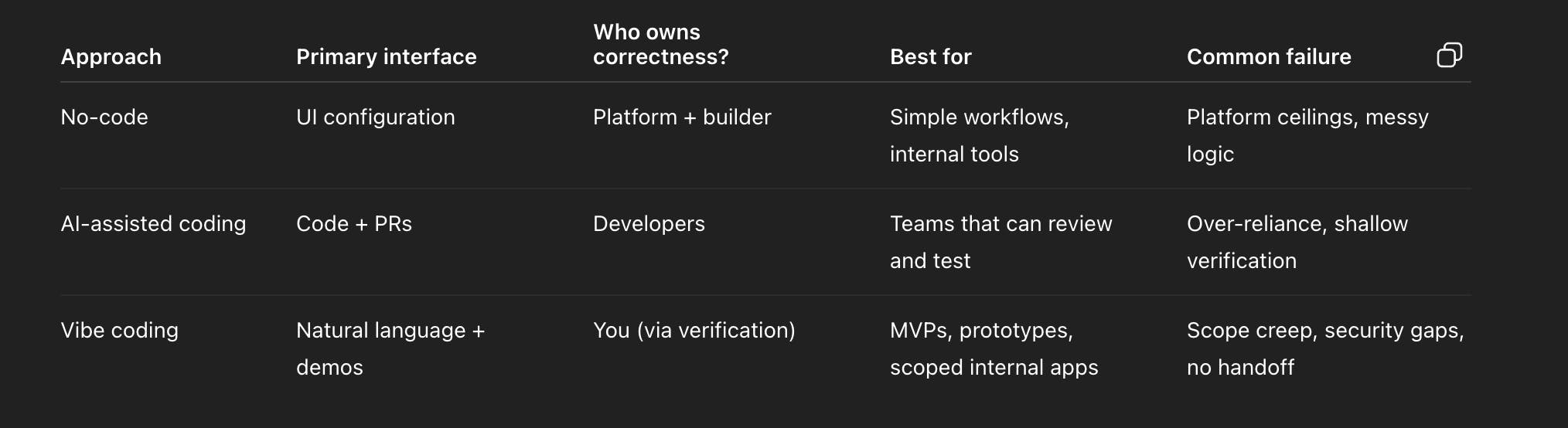
A key nuance from Simon Willison: if the AI wrote lots of code but you reviewed and understood it all, that’s closer to “AI-assisted coding.” Vibe coding usually implies you’re not reading every line, you’re steering by outcomes.
That distinction matters because it changes how you protect yourself.
Why vibe coding works, and why it fails
Why vibe coding works
Vibe coding works because it compresses the build loop.
In traditional software, you often pay for:
- translating an idea into specs,
- translating specs into code,
- translating bugs into fixes,
- translating user feedback into the next iteration.
Vibe coding collapses that into a tighter loop:
- express intent,
- generate,
- run,
- prompt,
- repeat.
That’s why the approach feels like a superpower, especially for MVPs and internal tools.
Lovable’s docs explicitly push this pattern: start outside the tool, write it out first, choose your build style, use Plan mode, break work into bricks, prompt with purpose, avoid infinite error loops, and validate fast. That is basically “vibe coding, but with guardrails.”
Claude Code’s docs describe an agentic loop where it gathers context, takes action with tools, and verifies results. That “verify” step is the reason repo-based vibe coding can be safe enough for serious work.
Why vibe coding fails
Vibe coding fails for predictable reasons:
1) You build before you validate
AI makes building easy, which makes building the wrong thing easy.
If you don’t have demand or a clear pain, your vibe-coded app becomes an expensive hobby with a login screen.
Do this first: Validate your MVP idea in 7 steps (scripts included).
2) You let scope expand with every prompt
Vibe coding feels like infinite possibility. That’s a trap.
Every new:
- role,
- workflow branch,
- integration,
- “admin feature,”
- edge case,
adds complexity and testing surface area.
If you want a fast, honest scope check, run the idea through the MVP Cost Estimator and use the cut list.
3) You keep rules in your head instead of the system
Vibe coding encourages “do it like this” prompts, but rules need to be enforceable:
- permissions,
- validation,
- required fields,
- audit trails.
If rules aren’t enforced, you get silent data corruption, the hardest bug category for ops tools.
4) You ship without ownership and handoff
If your entire build only exists inside one tool and one person’s memory, you do not have a product, you have a demo.
Lovable explicitly encourages using GitHub and version control wisely, and it calls out best practices and “remix if messy.”
That’s not fluff. It’s survival.
5) You ignore SEO and distribution
A lot of vibe-coded apps are client-rendered web apps. SEO and distribution are not automatic.
Lovable’s SEO/GEO guidance is blunt: the agent may add titles/descriptions based on prompts, but it’s not systematic, you should treat SEO and GEO like code, something you intentionally review and refine.
The VIBE OS (a ship-ready workflow)
Here’s the workflow that makes vibe coding useful beyond demos.
VIBE OS stands for:
- V = Validate (prove the problem and buyer)
- I = Intent (turn the vibe into a 1-page spec)
- B = Build (small increments, scope locked)
- E = Evaluate (verify behavior, then ship)
If you do these steps, vibe coding becomes a delivery system.
V = Validate (before you write “hello world”)
Validation isn’t a vibe. It’s evidence.
Your goal is not “people like my idea.”
Your goal is “the ICP has this pain, often, and will commit time or money to fix it.”
A good validation loop includes:
- 10 to 15 conversations with real ICPs,
- a landing page test,
- a pricing or commitment test.
Use Validate your MVP idea in 7 steps if you want a scripted workflow that forces evidence.
I = Intent (the anti-chaos spec)
Vibe coding breaks when intent is fuzzy. Fix it with a 1-page spec.
At minimum, write:
- the core loop (3 to 7 steps),
- roles (2 to 3),
- objects (3 to 5),
- 5 to 10 rules,
- out-of-scope list,
- success metric.
If you want a fast way to generate this, use Mini PRD Generator. It’s specifically designed to avoid “PRD novels” and focus on the core loop and acceptance criteria.
B = Build (small increments, scope locked)
Your job is not to build “the app.”
Your job is to ship the smallest workflow that proves value.
Use these “scope locks”:
- One core loop
- Two roles (user + admin, maybe manager)
- One integration (if you must)
- One platform (web)
Want a reality check? Run MVP Cost Estimator. It explicitly scores complexity based on drivers like platforms, auth, payments, roles, integrations.
E = Evaluate (verify, then ship)
Vibe coding without evaluation is just random prompting.
Evaluation means:
- core loop tests,
- permission tests,
- error state tests,
- smoke tests after each change,
- and a rollback plan for production.
Claude Code’s “how it works” doc is basically this loop: gather context, take action, verify results, repeat until complete.
That’s the mindset shift:
- not “make it look right”
- “make it behave right”
Vibe-coded an MVP and need to launch it to paying users?
We take working AI prototypes, harden the database and payments, and launch them in 2–4 weeks for a flat $5k.
Vibe coding with Lovable
Lovable is vibe coding for full-stack web apps: you prompt, it generates app code, you iterate fast, then you publish and optionally sync to GitHub. Lovable’s docs provide explicit best practices for going from idea to working app, including Plan mode and how to avoid common pitfalls.
If you want the dedicated end-to-end workflow, start with Build with Lovable in 2026.
The Lovable workflow that actually ships
Lovable’s “From idea to working app” guide recommends:
- start outside Lovable,
- write it out,
- choose build style,
- use Plan mode,
- break it into bricks,
- prompt with purpose,
- avoid the infinite error loop,
- validate fast.
Translate that into a simple delivery workflow:
- Validate the problem and ICP
- Write the 1-page intent doc (core loop + rules + out-of-scope)
- Use Plan mode to generate screen map + data model + acceptance criteria
- Build the minimum screens
- Add auth + permissions
- Add integrations
- Publish, then do a launch checklist
- Sync to GitHub once you feel complexity rising
“North Star Prompt” template for Lovable (copy/paste)
Paste this as your first prompt (or use it to reset the project’s direction):
You are building a production-minded web app.
Product: [one sentence].
Primary user: [persona].
Problem: [why they care].
Success metric: [north star].
MVP core loop (3–7 steps):
- …
- …
- …
Roles: [User, Admin, …]
Data objects: [3–5 objects]
Rules:
- [If X then Y]
- [Validation / permission constraints]
Out of scope (explicitly do NOT build):
- [10 items]
Output exactly:
- Screen map with routes
- Data model proposal
- Permissions approach
- Acceptance criteria
- Launch checklist
Why this works: it gives Lovable a stable “contract,” and it gives you something to push back against when feature creep hits.
The “bricks” approach (how to avoid the infinite error loop)
Lovable explicitly advises breaking down the build into “bricks” and avoiding the infinite error loop.
In practice:
- build one screen,
- connect it to one piece of data,
- verify it,
- then move to the next.
Do not ask Lovable to “build the whole app” in one go.
That’s how you create a codebase that only the AI understands.
Permissions and safety (MVP version)
If your app has multiple users and shared data, permission mistakes become existential.
Your MVP permission model should be:
- 2 roles max,
- clear ownership of records (ownerId),
- admin override only for necessary things,
- logs for critical actions.
If you’re doing “ops tooling,” this matters even more. One wrong permission and you leak vendor data, employee info, or customer details.
SEO and GEO for Lovable apps (the realistic version)
If your Lovable app has public pages that need to rank, treat SEO like code.
Lovable’s SEO/GEO doc explicitly says the agent may add SEO elements based on prompts, but it’s not systematic, and you should review and refine it intentionally.
So:
- define which pages are public and indexable,
- ensure each has correct titles and descriptions,
- ensure internal links exist and are crawlable,
- make sure you ship with a real domain and consistent URLs.
If SEO is your primary distribution channel, don’t “hope” Lovable handles it. Make it part of scope.
Vibe coding with Claude (Claude Code)
If Lovable is “prompt to app,” Claude Code is “prompt to codebase.”
Claude Code is designed as an AI coding assistant that understands your whole codebase and helps you build features and fix bugs, by using tools to read files, edit code, and verify results by running commands.
This is why Claude Code is a great fit for vibe coding safely:
- it doesn’t just generate, it can also verify.
The Claude Code agentic loop (the part you should copy)
Claude Code describes three phases:
- gather context
- take action
- verify results
If you want production-ish vibe coding, insist on phase 3 every time.
That means: after every change, Claude runs:
- tests,
- lint,
- type checks,
- or at least a “smoke test” command.
Create a repo harness with CLAUDE.md
Claude Code supports project instructions via a CLAUDE.md file that it can read at the start of sessions, helping you encode standards, commands, and constraints.
Here’s a template you can copy into your repo:
CLAUDE.md template (copy/paste)
- Project in 3 lines:
- What this app does
- Who it’s for
- Core loop
- Stack:
- Frontend:
- Backend:
- Database:
- Auth:
- Payments:
- Hosting:
- Commands:
- Install: ...
- Dev: ...
- Test: ...
- Lint: ...
- Build: ...
- Rules (non-negotiable):
- Keep changes small and incremental.
- Do not add dependencies without asking.
- Do not change database schema without a migration plan.
- Always verify results by running tests or build commands.
- Prefer clarity over cleverness.
- No secrets in code, use env variables.
- Output format:
- Summary of changes
- Files changed
- Commands run and results
- Remaining risks and next steps
This single file turns “vibe coding” into “repeatable engineering.”
Claude Code prompt templates (ship-focused)
Below are templates that work because they constrain scope, force verification, and avoid wandering.
Template 1: Fix a bug (smallest possible change)
Bug summary: [one sentence]
Expected behavior: [what should happen]
Actual behavior: [what happens]
Repro steps:
- …
- …
Constraints: minimal change, no new dependencies.
Please:
- identify root cause,
- implement fix,
- add or update a test,
- run tests and report the output.
Template 2: Add one feature (scope locked)
Feature: [one sentence]
Acceptance criteria:
- …
- …
Constraints:
- Do not change the data model (unless absolutely necessary)
- No new dependencies
- Keep UI minimal
Verify: run ... and report results.
Template 3: Refactor for clarity (no behavior change)
Refactor goal: improve readability and reduce duplication.
Constraints: no behavior changes, keep existing public interfaces stable.
Verify: run ....
Template 4: Hardening pass (permissions + data exposure)
Review the app for data exposure risks and permission gaps.
Focus areas: auth, authorization checks, multi-tenant boundaries, admin endpoints.
Fix critical issues only, then run tests and summarize remaining risks.
This template matters because vibe-coded apps often fail through permission gaps, not through UI.
Lovable → GitHub → Claude Code: the hybrid workflow
This is the most practical “2026” workflow for many founders and teams:
- Lovable for scaffolding and rapid UI iteration (fast convergence on screens and flow).
- Sync/export to GitHub for ownership and collaboration (so you can hand off). Lovable explicitly highlights GitHub integration and version control practices.
- Use Claude Code to implement deeper logic, write tests, refactor safely, and follow an agentic verify loop.
When the hybrid approach is a great fit
Use the hybrid approach when:
- you want speed now, but you expect a real product later,
- you need stronger verification than “it seems to work,”
- you care about handoff quality,
- you are building an ops tool that will become “system of record.”
If your “app” is replacing spreadsheets or Airtable workflows, read these companions:
The handoff checklist (copy/paste)
Before you call something “shipped,” confirm:
- Repo ownership: code lives in a repo you control
- Env and secrets: all secrets are env vars, documented
- DB schema: entities and relationships documented
- Permissions: written down in plain English and enforced
- Core flow test: at least one smoke test path exists
- Deployment: reproducible build and deploy steps
- Monitoring: at minimum, error logging is enabled
- Next steps: a short backlog of “v1.1” improvements
This is how you avoid the “demo cliff,” where the prototype cannot evolve.
Scope, budget, and reliability
Vibe coding changes how you build. It does not change what complexity costs.
Scope locks that keep you sane
If you want to ship quickly:
- One core loop
- Two roles
- One integration
- One platform
- Human-in-the-loop for anything risky
Then use MVP Cost Estimator to see what’s pushing you into “complex.” The tool explicitly models complexity drivers like auth, payments, roles, integrations, platforms.
If you vibe code AI features, budget the “run cost”
AI features feel cheap until:
- you pay per token,
- you hit quality issues,
- you need evaluation and guardrails.
This is why AI MVPs often get expensive when teams try to solve reliability too early. Your “build cost” and “run cost” are different.
If you’re adding AI, read Typical AI MVP budget and cost drivers.
When to stop vibe coding and bring in a team
Vibe coding is a phase, not a religion.
Bring in a team (or at least a more structured engineering workflow) when:
- You’re handling sensitive user data and permissions must be correct.
- Payments and entitlements must be correct.
- Reliability becomes the product (not the feature).
- You need monitoring, incident response, and consistent deployments.
- You keep “prompting around” bugs instead of fixing root causes.
If you’re hiring help, do not wing it. Use Freelancer vs agency risk checklist.
If you want a done-for-you path:
FAQ
What is vibe coding in one sentence?
Vibe coding is building software by describing intent in natural language to an AI, iterating on behavior, and often accepting AI-generated code without reviewing every line.
Is vibe coding “real programming”?
It can be. You’re still making engineering decisions about scope, architecture, security, and verification. What changes is that your primary interface becomes intent and tests, not syntax.
Is vibe coding safe for production?
It can be, if you add guardrails: permissions, tests, code ownership, and verification after every change. Claude Code explicitly frames its workflow around gathering context, taking action, and verifying results with tools like running tests.
How do you vibe code with Lovable?
Use Plan mode, lock scope with a North Star prompt, build the core screens first, add auth and permissions early, then sync to GitHub once complexity rises. Lovable’s docs emphasize Plan mode, breaking work into bricks, and best practices for shipping.
How do you vibe code with Claude?
Use Claude Code on a repo, add a CLAUDE.md file with commands and constraints, work in small bounded tasks, and force verification by running tests or builds after changes.
What’s the fastest way to turn vibes into a buildable plan?
Generate a 1-page spec with core loop + acceptance criteria using Mini PRD Generator.
When should you not vibe code?
When you cannot tolerate mistakes (strict regulatory context from day one), when you need complex enterprise-grade multi-tenant rules immediately, or when you don’t have a way to verify changes and own the code.
Conclusion
Vibe coding is not “coding without thinking.”
It’s “thinking in outcomes and constraints,” and letting AI do the typing.
If you want to vibe code and still ship a real product:
- Validate
- Write intent (Mini PRD)
- Build small and locked-scope
- Verify every change
- Own the codebase and handoff
Start with:
- Build with Lovable in 2026 if you want the Lovable workflow
- Mini PRD Generator if you need a ship-ready spec
- MVP Cost Estimator if you need a cut list
- Or Build Your MVP for $5,000 if you want it done for you
Cross the 80% Vibe-Coding Finish Line
Vibe coding is the best prototyping revolution of the decade. But when you need real user accounts, bulletproof security, and Stripe payments, you need disciplined engineering. At Tessellate Labs, we turn your vibe-coded ideas into production reality.
Keep Reading
How to Build an Internal CRM With AI (A Real Build, Step by Step)
A real, step-by-step build: how a seven-person video studio replaced a 2,400-row spreadsheet with a custom internal CRM in nine days using AI — the data model, prompts, security rules, costs and results.
Read more
Build a Simple Productivity Workflow With AI
A practical 7-step method to turn one repetitive weekly task into an AI workflow: pick the task, map it, prompt it, connect it, keep a human checkpoint, and measure the hours you get back.
Read more
How to Scan AI-Generated Software for Security Vulnerabilities
A practical, five-layer playbook for scanning AI-generated apps: secrets, dependencies, SAST, access control and runtime testing — plus a 30-minute self-audit and pre-launch checklist.
Read more